Forgot My Password
If you forget your elluminate password, you can create a new one.
- From the elluminate login screen, click on the Forgot Password? link just above the password field. The Reset Password window displays.
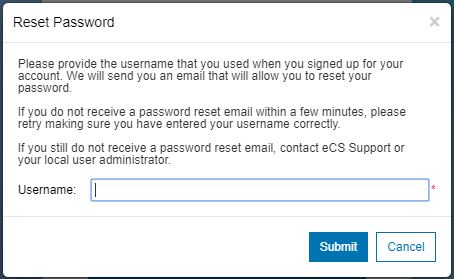
- Enter your Username.
- Click Submit. A confirmation message displays indicating that your password has been successfully reset.
- Check your email for a temporary password, and follow the instructions to create your new password.
Note: If you are using Active Directory, follow your organization’s process for resetting your password.
Important: If you get locked out of your account, resetting your password isn't an option. Follow the instructions here instead: How do I get back into my locked elluminate account?
Change My Password
If you know your elluminate password, but you want to change it, you can do that as well.
- From the elluminate Platform menu, click on the My Profile link at the top left to open your elluminate profile.
- Under the My Information section, next to Password:, click on the Change link.
- Enter your Current Password once, and your desired New Password twice to confirm it.
- Click Save. A confirmation message displays indicating that your password has been successfully changed.